






Table of Contents

Key Takeaways:
- Employees without work email need verified identity, a supported authentication method, private review access and reliable recovery.
- Test employee-ID workflows, phone-based options, shared kiosks and identity providers without assuming any are available in the product.
- Require a live demonstration of twelve access, security, accessibility and employee-participation scenarios.
- Protect private review content during logout, recovery, manager assistance, transfers and interrupted sessions.
- Count verified employee participation from unique employee records, not invitation volume or manager feedback submissions.
Employees can participate in digital performance reviews without a company email address, but only if the software supports an approved way to identify each worker, authenticate them, protect their private review and recover access. A vendor's statement that its product is “mobile-friendly” does not answer those questions. Manufacturing operators, retail associates, warehouse workers and field technicians may use shared devices or have no business inbox, so HR must demonstrate the actual sign-in and review workflow.
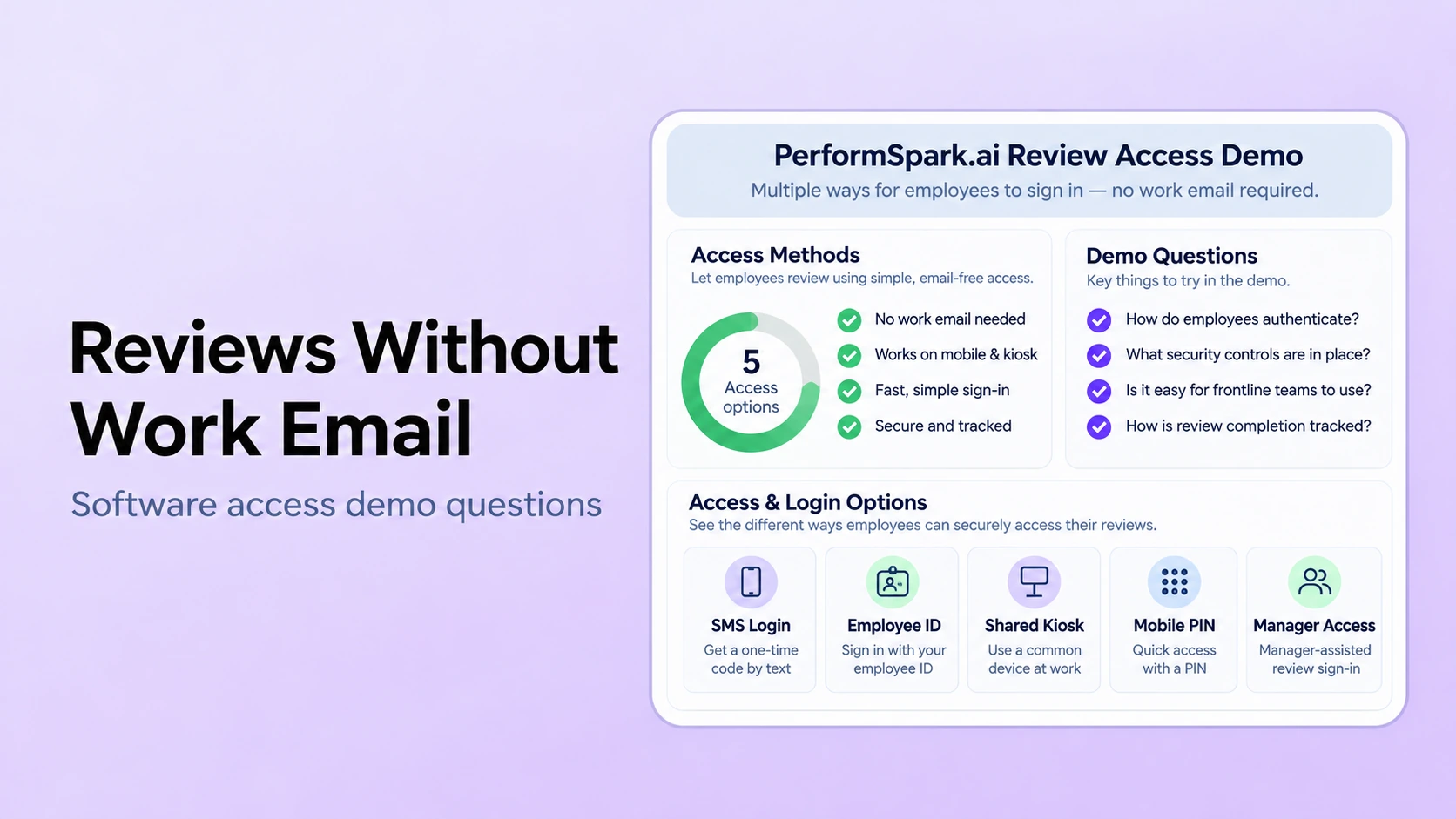
Potential methods include employee ID with a separate authenticator, identity-provider accounts that do not rely on company email, approved phone-based verification, or supervised shared-device enrollment. These are methods to evaluate, not verified PerformSpark sign-in features. Personal phone, SMS, shared kiosk and email-free access must each be checked against the organization's security, accessibility, labor and privacy policies.
Below are 12 buyer demo questions, a synthetic worker test, and acceptance criteria covering identity, sign-in, private reviews, deadlines and recovery. This guide deepens the access portion of our frontline performance review software buyer's checklist, rather than repeating that broader feature comparison.
Start by separating employee identity from work email
An employee identifier is not necessarily an authenticator. A payroll ID may identify a worker in an HR system, but knowing that ID should not be sufficient to read confidential feedback. The vendor must show how the application confirms that the person signing in actually controls the authorized account, including during first use and account recovery. See NIST's current authentication and authenticator guidance for a security reference, while recognizing that its federal requirements do not automatically apply to every private employer.
Ask whether the proposed system requires an email address as a database field, requires an inbox to receive an invitation, or requires email only for password recovery. Those are different restrictions. A user might have a personal email address but decline to use it for work, while another may have neither a reliable phone nor a private inbox. HR should not force enrollment in a personal account without understanding the relevant employment and privacy policies.
Consider the whole lifecycle: provisioning from a trusted source, first-login identity checks, account recovery, role changes, termination and secure retention of a completed employee review. The employee must remain the same person in the system even when their shift, department or manager changes.
What should HR ask vendors to demonstrate?
1. Can a worker enroll without an organizational email address?
Scenario: create a synthetic warehouse associate, F-071, with a unique employee ID, supervisor assignment and no email field. Ask the vendor to provision the account, show the exact invitation or registration process and explain how identity is verified. Have the associate complete the process as an end user, not through an administrator's impersonation.
Passing evidence: the account is associated with the correct employee and no inaccessible work-email link blocks first use. Failure: the vendor manually inserts a fictitious mailbox, bypasses authentication or shows only a slide. Ask whether the employee-data integration or a managed import can provision accounts reliably.
2. What actually authenticates someone who enters an employee ID?
Test whether entering an employee or badge ID is only the username or also unlocks the review. A predictable ID by itself is an inadequate identity check. Require a separately approved authentication mechanism and ask how attempts are monitored, rate limited and protected against shared credentials. Do not assume employee ID plus PIN is available until the vendor demonstrates it.
Passing evidence: one employee cannot open another employee's self-review and feedback by changing an identifier. Failure: knowing a coworker's ID grants access or displays sensitive comments before authentication.
3. Are phone-based login and verification optional, secure and policy-approved?
Some vendors may propose a one-time passcode to an employee-controlled phone. Test the enrollment proof, phone-number change, lost-device recovery and whether the employer requires staff to use personal devices. SMS has security and delivery limitations; do not describe it as universally appropriate multi-factor authentication. Ask whether a non-phone alternative exists and whether the vendor supports the security assurance your organization requires.
Passing evidence: the employee can complete an approved method and a controlled recovery without supervisor guesswork. Failure: the system silently sends private review text to a number controlled by someone else or treats a public/shared phone as personal.
4. Does a shared kiosk protect the next worker's review?
Set up an approved tablet in a break room. Have F-071 open the review, enter an unfinished self-assessment, sign out and hand the device to fictional worker F-072. Check browser history, saved credentials, download folders, cached files, back navigation and whether the previous review can be reopened without reauthentication. Inspect idle timeout behavior and whether local device management is needed.
Passing evidence: F-072 cannot see F-071's feedback or resume F-071's session. Failure: the next person can use the back button or stored link to read another review. NIST's session-management guidance addresses expiration and reauthentication as security considerations, although a buyer must determine its own applicable controls.
5. Can an employee respond using an accessible sign-in flow?
Try keyboard navigation, screen-reader labels, text enlargement, password manager or paste support, accessible error messages and an approved alternative to a memory-only challenge. WCAG 2.2 Accessible Authentication (Minimum) addresses sign-in barriers. Ask the vendor to identify the accessibility conformance level it supports and any known exceptions; do not assume a claim of compliance without a relevant audit.
Passing evidence: a test user can reach and submit the review with the tested assistive method and no inaccessible recovery gate. Failure: the primary route is accessible but account recovery requires an unusable CAPTCHA or a mobile device the employee does not possess.
6. What happens when a phone, tablet or connection fails during a review?
Start a self-assessment, enter several responses, interrupt connectivity and reload the page. Ask whether drafts persist, how conflicts are resolved when two sessions are open and whether interrupted submissions can be recovered. Also test a long-form review from an older supported mobile device and determine whether a printed or supervised alternative is allowed under policy.
Passing evidence: the product accurately tells the worker what saved, what failed and how to resume. Failure: the page reports success but loses the response. Do not assume offline mode or cross-device autosave because a sales presentation uses the word “mobile.” Compare with the software pilot test framework.
7. How does the employee receive a reminder without exposing confidential content?
Assign F-071 an approaching review deadline. Have the vendor show notification options for someone without a business email address and test whether the message reveals private ratings, supervisor notes or a token that allows direct entry without authentication. Confirm delivery preferences, role changes and opt-out requirements where relevant.
Passing evidence: a secure reminder directs the correct person to the protected app without disclosing the evaluation itself. Failure: an SMS preview or a shared kiosk alert includes sensitive HR information. Ask about the actual configuration of notifications and reminders.
8. Can HR recover an account without exposing the review?
Suppose F-071 loses access to their registered phone two days before a deadline. Require a documented recovery workflow with identity verification, restricted admin privileges, logging and a way to notify the employee of a recovery change. Demonstrate the new access method and revocation of the old one. A supervisor should not receive a plaintext password or gain access to the employee's private responses merely to help them log in.
Passing evidence: the user returns to the same record, old credentials are invalidated as appropriate, and HR can review the recovery event. Failure: support changes an account based only on a name and employee ID. NIST account-recovery guidance provides a useful risk model, though the employer must select controls suitable for its environment.
9. What does the employee see before and after manager approval?
Have F-071 complete their self-review, then let the supervisor add an evaluation and HR finalize the record. Test which notes are visible at each stage and whether the employee can acknowledge or respond to the final review. An account that can sign in but cannot reach the correct review has not solved the access problem.
Passing evidence: visibility follows a stated approval workflow and any response is retained with attribution. Failure: the employee sees HR-only deliberations or an inaccessible form after finalization. Consult confidential review permission tests for more detailed examples.
10. Does a shift or location transfer preserve the same account and history?
Move F-071 from Store A to Store B or from day shift to night shift during an active review. Change the manager assignment and remove the former manager's access. Verify that the employee can continue to authenticate under the same identity and that the review history remains correctly attributed.
Passing evidence: there is one employee identity, a clearly assigned review owner and appropriate restricted historical access. Failure: the employee must start a second profile or an old supervisor retains unrelated private access. Use the multi-location review guide for related reporting needs.
11. Can managers support workers without impersonating them?
Ask the supervisor to help an employee who cannot finish a review. Test a proper delegation or supported-assistance process, and inspect whether the record distinguishes manager comments, employee responses and any authorized proxy action. Employees may need accessible assistance or an alternative process, but a manager entering an employee's self-assessment as if it were firsthand is not an acceptable default.
Passing evidence: the source of every response is clear, and the employer has an appropriate employee acknowledgment process. Failure: the manager can silently replace an employee's words. Check manager responsibilities using the manager workflow and worker participation through feedback and surveys.
12. Can HR prove who participated without double-counting?
Run a pilot with six synthetic employees, including one transfer, one account recovery, one incomplete review and one worker whose manager submitted two feedback entries. Request reporting for invited, authenticated, started, submitted, acknowledged and finalized states, with the definition of each measure. Separate employee participation from the number of supervisor comments.
Passing evidence: the reporting dashboard reconciles to six distinct employee identifiers and shows where the flow failed. Failure: a worker who transferred appears twice in the completion denominator. Use reporting validation tests for reconciliation details.
Compare sign-in options without assuming vendor support
Employee ID plus a separately verified authenticator: potentially appropriate where a company controls enrollment and account recovery; the ID alone must not unlock a review. Personal phone verification: may be feasible only when the worker has an approved device and the employer handles consent, replacement and alternatives. Shared-device access: requires individual authentication, effective session closure, and control over local downloads. Enterprise identity provider: may provision accounts without individual company mailboxes, but the exact vendor integration, license and user identifier must be validated.
None of these options should be represented as existing PerformSpark capabilities without product-owner confirmation or a live demonstration. The thumbnail is an illustration of access paths to ask about, not evidence that all four are offered. Use the security overview and integration information to prepare verification questions, then request specific configuration evidence.
A ready-to-run 20-minute frontline access demo
Illustrative test dataset: F-071 is a warehouse employee without work email; F-072 shares the approved kiosk; F-073 changes location; F-074 loses a registered device; F-075 uses an assistive technology; and F-076 has a supervisor change. Create these records synthetically before comparing vendors. Ask the vendor to use the intended user role rather than an administrator-only preview.
- Provision F-071 without entering a made-up business address, and complete approved first-time identity verification.
- Have F-071 start a self-review on a phone or kiosk; check draft preservation and successful submission.
- Sign out, hand the device to F-072 and attempt to reach F-071's review through browser history and saved navigation.
- Recover F-074's account, test the accessible route for F-075 and change F-076's reviewer ownership.
- Export participation and status reporting for all six employees; reconcile employee IDs and unanswered reviews.
Record each observed result with the user role, device, method, expected outcome, actual outcome, configuration dependency and evidence. A slide that lists SMS, badge ID or kiosk support is not a successful test. For organizations using frequent shift changes, the separate shift supervisor handoff guide explores reviewer continuity rather than authentication mechanics.
Frontline Review Access
Test review access for employees without work email
Bring employee, shared-device and account-recovery scenarios to a demo. Ask which sign-in methods are actually supported and how private review access is protected.
Score access and privacy as release gates, not optional features
Use a simple scale of 0 = not demonstrated, 1 = partly demonstrated with a documented workaround and 2 = successfully demonstrated for the proposed user role and device. Score all twelve buyer tests with the same synthetic data. Mark issues that require an additional authenticator, identity provider, notification channel or managed device.
Set hard gates in advance. The ability to open another employee's review, bypass initial identity verification, recover an account without adequate controls or leave sensitive content in a shared kiosk session should block purchase approval until resolved. A working employee sign-in method also needs an accessible and supported alternative path for the relevant workforce.
When the organization includes contractors, unionized workers or cross-border staff, confirm any additional workforce-policy and legal requirements with qualified advisers. Security standards and accessibility guidance can inform the evaluation, but a blog checklist cannot certify product security or legal compliance.
Eight questions to send software vendors before the demo
- What exact account identifier and authentication method can a worker use without a company mailbox?
- Can we enroll an employee who lacks both personal email and a private phone?
- How is first-use identity verified, and which roles may recover or replace an authenticator?
- What prevents a second worker from reopening the prior review on a kiosk or shared tablet?
- Which accessible login and account-recovery alternatives are supported and tested?
- What happens to unsent review text when connectivity fails or an account times out?
- Can managers provide assistance without editing an employee's self-assessment under the employee's identity?
- What data and audit exports prove participation, review approvals, transfers and recovery events?
Combine those questions with a broader performance management software RFP if procurement also needs pricing, implementation, support, data export and contract review. For employee follow-up after a completed review, individual development planning may be relevant, but do not overload this access-focused evaluation with a full development-workflow demo.
Where PerformSpark fits into the shortlist
PerformSpark publishes pages about performance reviews, employee and manager participation, notifications, privacy, and reporting. Those areas make it reasonable for a frontline HR buyer to request the above access demonstration. They do not, by themselves, prove that employee-ID login, SMS login, kiosk mode, offline self-reviews or a particular identity-provider integration is available in the current product.
Ask the PerformSpark team to show exactly which of the twelve scenarios it can complete today with the proposed configuration. Document which methods need third-party software, policy approval or a manual alternative. If a route is unavailable, the vendor should state that clearly so HR can plan an inclusive, secure process rather than assuming a promised feature exists.
Final decision: an invitation is not successful access
For employees without work email, a usable review process begins with reliable identity verification and ends when the employee can securely read, complete, respond to and revisit the appropriate record. A tool is not suitable merely because administrators can invite workers or managers can enter scores on their behalf.
Give every shortlisted vendor the same twelve access tests, include shared-device and recovery exceptions, and compare observed results rather than proposed login methods. A strong evaluation preserves employee privacy and makes it practical for frontline staff to participate in the review process.
Frontline HR and People Teams
Make performance reviews accessible to every employee
Evaluate employee login, shared-device privacy, identity recovery, reviewer permissions and participation reporting with the PerformSpark team. Confirm which methods are supported today.
Book a PerformSpark Demo →Bring the twelve employee access test cases