



Goal(OKR)

OKR Software for HR Teams: How to Choose Without Overcomplicating Goal Tracking

Updated :
June 22, 2026

Mahesh Kumar

Founder, TraineryHCM.com

Table of Contents

Search "best OKR software" and the first five results compare eight, ten, even thirteen tools across dozens of features, AI capabilities, customization depth, strategy maps, and scoring rubrics. By the third comparison table, most HR teams are no closer to a decision than when they started. The irony is that OKR software exists to simplify goal tracking, and the buying process for it has become exactly the kind of complicated, sprawling exercise the framework was built to avoid.

HR teams have a narrower, more specific need than the generic "any team, any department" framing most buying guides assume. HR is usually the function rolling out OKR software company-wide, which means evaluating it for every other department’s use case. HR is also, separately, a department with its own goals: reducing time-to-hire, improving retention, and lifting engagement scores. Most OKR content treats these as the same problem. They are not, and conflating them is part of why the decision feels harder than it needs to be.

This guide cuts the evaluation down to the features that actually predict adoption, walks through a three-step framework for choosing without the 10-factor sprawl, and covers how HR teams specifically use OKRs, both for the organization and for their own department.

What Is OKR Software for HR Teams?

OKR software for HR teams is goal-management software built around the Objectives and Key Results framework, where a qualitative objective pairs with measurable key results that prove progress toward it. For HR specifically, the software typically does two jobs at once: it is the platform HR administers for every department’s goals, and it is the tool HR uses to set and track its own objectives, things like reducing time-to-fill for open roles, improving 90-day retention, or hitting an internal mobility target.

This dual purpose is what most generic goal-setting guides miss. A sales team evaluating OKR software only needs the first use case. HR needs both, and the features that matter for administering goals company-wide are not always the same features that matter for HR’s own goal tracking.

Practitioner Insight: HR teams that roll out OKR software company-wide often forget to set OKRs for HR itself until months into the rollout, treating the function as the administrator rather than a participant. The teams that get the most value flip this: HR sets its own OKRs in the first cycle, using the same tool, which surfaces friction in the actual user experience before asking every other department to adopt it.

Why HR Teams Overcomplicate Goal Tracking

The overcomplication usually starts before the software is even selected. Four patterns show up repeatedly.

  • Feature-shopping instead of needs-mapping. Evaluating every available feature, AI drafting, strategy maps, KPI linking, scoring rubrics, before defining what HR is actually trying to fix, produces a comparison table with no clear winner, because every tool looks strong on some dimension.
  • Buying for the org chart, not the goal-setting maturity. A 50-person company evaluating enterprise-grade cascading hierarchies built for 5,000-person organizations is solving a problem it does not have yet, and the complexity slows adoption rather than supporting it.
  • Running multiple frameworks at once before the first one sticks. OKRs, SMART goals, and KPIs are not competing systems, but trying to support all three from day one multiplies the configuration decisions HR has to make before anyone sets a single goal.
  • Treating HRIS and compliance as an afterthought. Integration and data privacy questions often surface during procurement, after a tool has already been selected on feature fit, which forces a second evaluation cycle that could have happened the first time.

Start With The Process, Not The Features

Before comparing tools, map what HR actually needs to track. A short goal management software checklist beats a feature-by-feature spreadsheet every time.

Book a Demo

The Only Features That Actually Matter for HR Teams

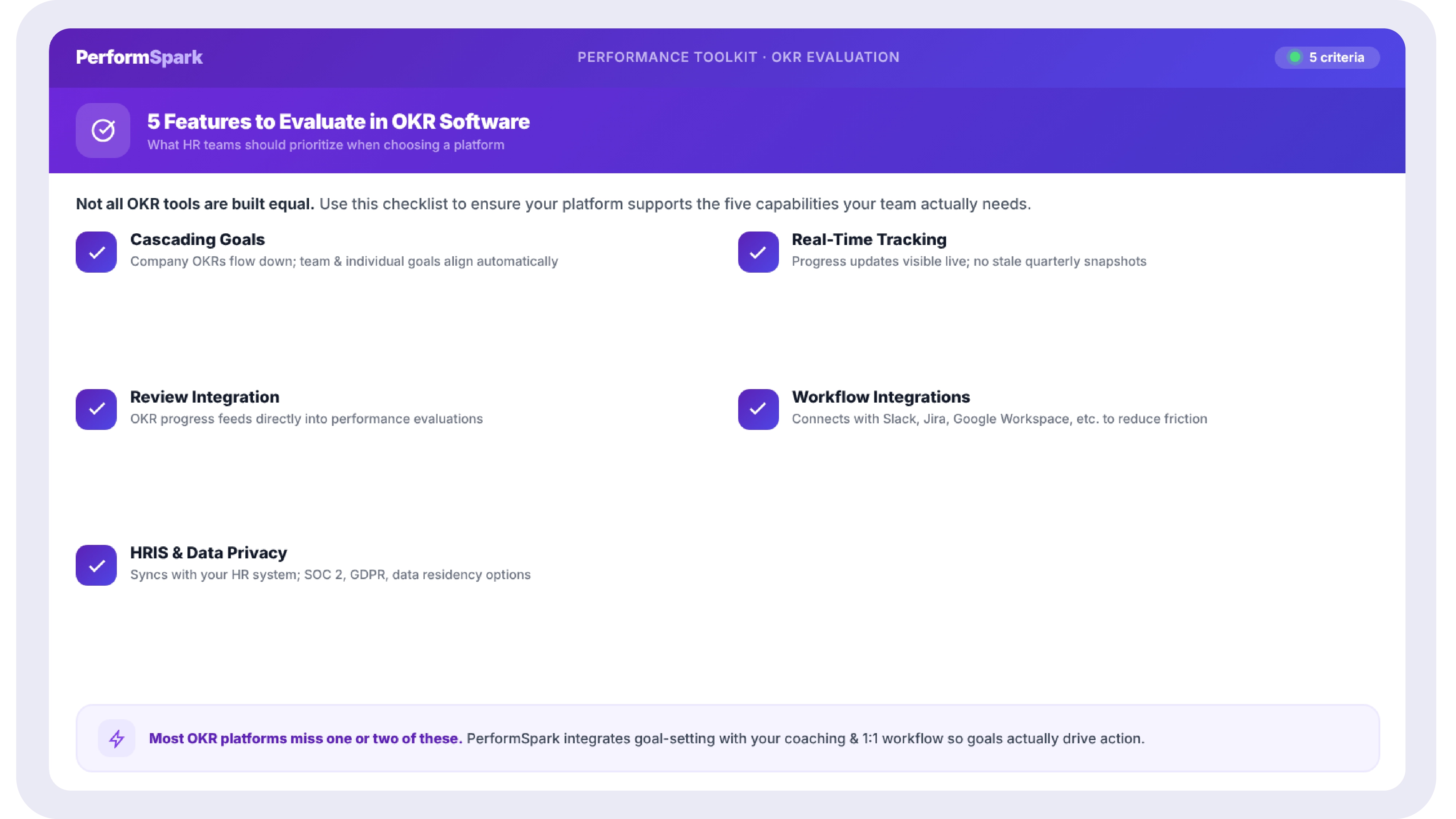
Strip away the feature lists that pad most buying guides, and five things consistently separate OKR software HR teams actually adopt from software that gets abandoned after one quarter.

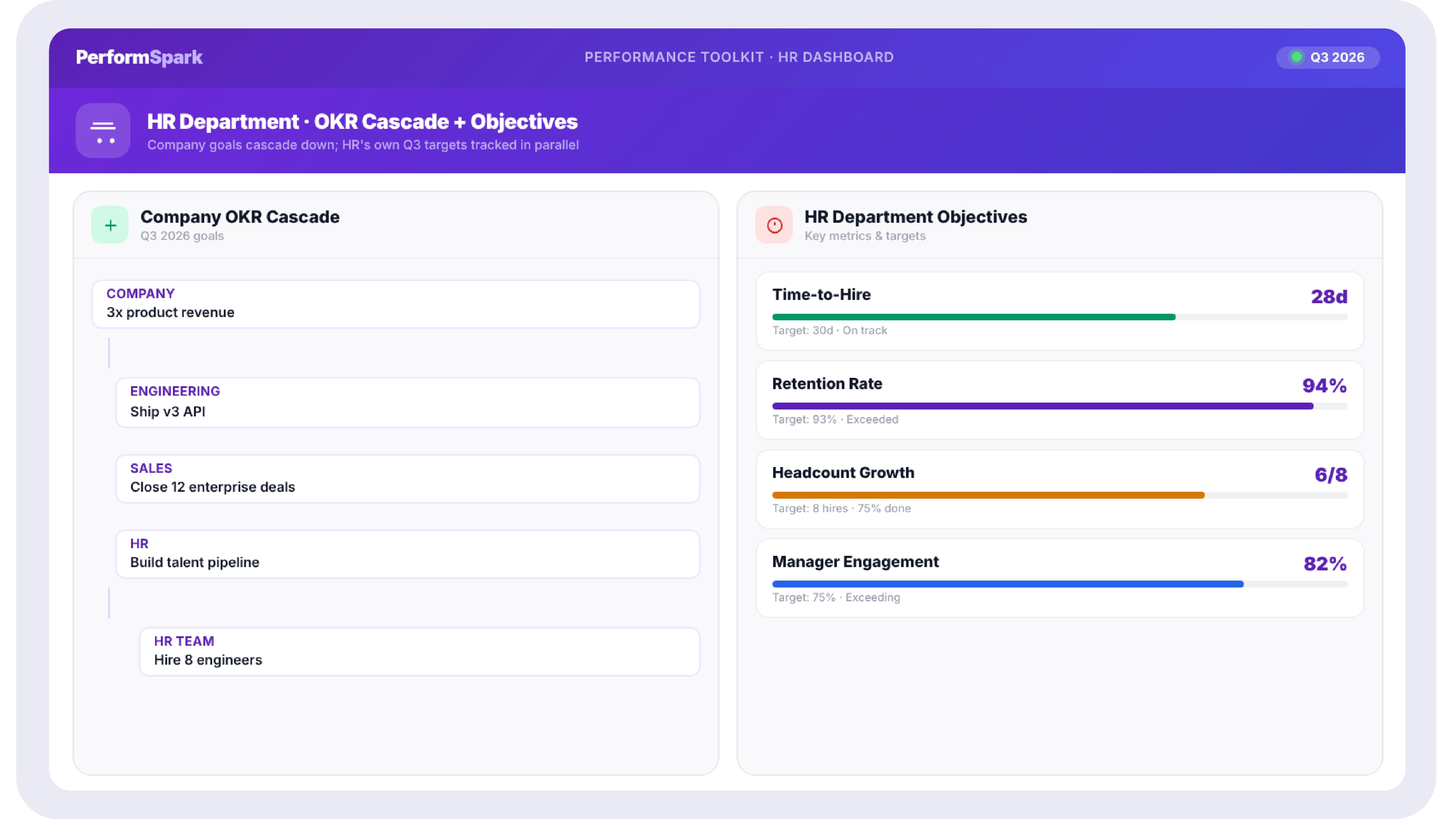
  • Cascading goals and a real hierarchy. Cascading goals connect individual key results up through team objectives to company priorities, so contributors can see how their work ladders up without HR manually mapping the relationships in a spreadsheet.
  • Real-time progress tracking, not manual percentage updates. If updating a goal requires logging into a separate tool and typing in a number, updates lapse within a few weeks. Real-time progress tracking pulled from connected systems keeps the data current without relying on memory.
  • Integration with performance reviews and one-on-ones. Goal progress that automatically surfaces inside one-on-ones and performance reviews turns goal tracking from a separate administrative task into part of the conversations managers already have.
  • Integrations with the tools teams already use. Slack, Jira, and Salesforce integrations matter more than any AI feature, since they remove the single biggest adoption barrier: asking employees to update goals in a tool they otherwise never open.
  • HRIS connectivity and HR-grade data privacy. Because OKR software touching HR data inherits HR’s compliance obligations, confirm HRIS sync and data privacy standards before evaluating anything else, not after a tool has already been shortlisted.
How OKR Software Differs from General Goal-Setting Software

OKR software is a specific type of goal-setting software, not a synonym for it. Goal-setting software is the broader category, and it may support OKRs, SMART goals, KPIs, or a custom framework. OKR software is purpose-built around the Objectives and Key Results structure, specifically: a qualitative objective, paired with two to five measurable key results, typically run on quarterly cycles. SMART goals operate differently. They are individual, outcome-focused targets (specific, measurable, achievable, relevant, time-bound) that work well for personal development goals but were not designed for the company-to-individual cascading that OKRs handle. Many organizations use both: OKRs for strategic, cross-functional priorities, and SMART goals for individual development goals inside an employee’s growth plan.

A Simple Framework for Choosing, in Three Steps

This replaces the 10-factor evaluation table most buying guides default to. Three steps, in order, are enough for most HR teams.

  • Step 1: Separate the two use cases. Decide whether you are evaluating software to administer company-wide goals, to run HR’s own OKRs, or both. The answer changes, which features matter actually, and prevents the comparison from sprawling across every possible HR workflow.
  • Step 2: Score against the five-feature checklist, nothing else. Run every shortlisted tool against cascading goals, real-time tracking, review, and one-on-one integration, workflow integrations, and HRIS or compliance fit. Anything beyond these five is a tiebreaker, not a deciding factor.
  • Step 3: Pilot with one team before a company-wide rollout. A four to six-week pilot with a single department surfaces adoption friction, missing integrations, and confusing workflows while the stakes are low, well before the cost of a full rollout makes those same problems expensive to fix.
Common Mistakes HR Teams Make When Choosing OKR Software

  • Evaluating AI features before evaluating adoption. AI-drafted goals are a convenience layer. A tool with weak adoption and strong AI still ends up as an unused tool with strong AI.
  • Skipping automated reminders as a "nice to have." Manual check-in reminders are the first thing to slip once a quarter gets busy. Automated reminders that nudge employees and managers before a goal goes stale are what keep an OKR program alive past the first cycle.
  • Letting the vendor demo define the evaluation criteria. Sales demos showcase the features the vendor wants to highlight, not necessarily the five that matter most for your rollout. Score against your own checklist first, then watch the demo.
  • Treating goal-setting software and performance management software as interchangeable. Goal-setting software creates, tracks, and aligns objectives. Performance management software uses that goal data alongside reviews and feedback to assess and develop employees. Many platforms do both, but confirm which one you are actually buying.

Keep Goals, Reviews, And 1:1s In One Place

See how PerformSpark keeps OKRs, performance reviews, and one-on-ones in a single system instead of three separate tools HR has to reconcile manually.

Book a Demo

How HR Teams Can Use OKRs to Improve Employee Engagement

OKRs improve engagement indirectly by making the connection between individual work and company priorities visible, not by being a survey or sentiment tool themselves. When employees can see how their key results ladder up into team and company objectives, the ambiguity that drives disengagement- not knowing whether the work matters- goes away. Pairing goal visibility with recognition reinforces the effect: when progress on a key result is acknowledged in the moment rather than only at quarter-end, employees experience goal-setting as a feedback loop rather than a top-down mandate.

Tying goal achievement to employee recognition inside the same system, both data points live in, keeps the connection between effort and acknowledgment close together in time, which is what makes recognition reinforcing rather than incidental.

Measuring HR Team Success With OKR Software

HR’s own OKRs deserve the same rigor HR asks of every other department. Examples of HR-specific objectives and key results worth tracking inside the same system used for company-wide goals:

  • Objective: Reduce time-to-fill across open roles. Key results: cut average time-to-fill from 45 to 30 days; reduce offer-decline rate from 18 percent to 10 percent.
  • Objective: Improve early-tenure retention. Key results: raise 90-day retention from 85 percent to 93 percent; reduce regrettable attrition in the first year by 20 percent.
  • Objective: Strengthen internal mobility. Key results: fill 25 percent of open roles internally, up from 12 percent; increase participation in internal development goal conversations by 30 percent.
  • Objective: Raise engagement and manager effectiveness. Key results: lift eNPS by 10 points; raise the percentage of employees with a completed one-on-one in the last two weeks from 60 percent to 90 percent.

Tracking these inside the same OKR software used for company-wide goals, rather than in a separate HR-only spreadsheet, means HR’s own progress is visible with the same real-time accuracy expected from every other department.

Implementing OKR Software in an HR Department: Step by Step

  • Set HR’s own OKRs first. Before rolling the tool out company-wide, use it to run HR’s own first cycle. This surfaces usability friction while the stakes are contained to one team.
  • Pilot with one additional department. Choose a team with a manager who is bought in, run a full four to six-week cycle, and gather specific feedback on what slowed adoption.
  • Fix the integration gaps before scaling. If goal updates require manual entry instead of flowing from connected tools, fix that before the second department onboards, since the friction compounds at scale.
  • Train managers before training individual contributors. Managers run the check-in conversations that keep OKRs alive between cycles. Investing training time in managers first produces better adoption than a single company-wide announcement.
  • Roll out company-wide in waves, not all at once. Staggering the rollout by department lets HR apply lessons from the pilot before the highest-stakes teams, usually the largest or most senior, go live.

The buying guides that dominate search results for OKR software solve the wrong problem. They add more tools to compare and more features to weigh, when what HR teams actually need is a shorter list: five features that predict adoption, a three-step framework instead of a ten-factor table, and clarity on whether the tool needs to handle company-wide goals, HR’s own OKRs, or both.

Why PerformSpark Is the Right Choice for HR Teams

Measured against the five-feature checklist this guide opened with, PerformSpark covers every one of them inside a single system. Goal management software handles cascading goals and hierarchy out of the box, so individual key results connect to team and company objectives without HR maintaining the mapping manually. Reporting and analytics deliver real-time progress tracking pulled from connected data rather than manual percentage updates. Performance reviews, check-ins, and 1:1s run in the same platform as goals, so progress surfaces automatically inside the conversations managers are already having instead of living in a separate, disconnected tool. TrAI brings AI-assisted goal drafting and insight to the goal-setting process itself, and smart notifications keep check-ins and updates from going quiet between cycles. For HR leaders deciding between a sprawling enterprise suite and a tool nobody adopts, PerformSpark is built around the same principle this guide argues for: the fewer systems HR has to reconcile, the more likely the OKR program survives past its first quarter.

That combination- goals, reviews, one-on-ones, recognition, and reporting in one place- is what makes PerformSpark the strongest fit specifically for HR leaders who need to administer OKRs company-wide while also running HR's own departmental objectives in the same system, not a second spreadsheet.
No More Stitching Tools Together

OKRs, Performance Reviews & 1:1s β€” Connected in One System

PerformSpark connects cascading OKRs to performance reviews, one-on-ones, and recognition, so HR runs company-wide goals and its own departmental objectives without stitching together separate tools.

Book a Demo β†’

Key Takeaways

  • Most OKR buying guides overcomplicate the decision by comparing ten or more tools across dozens of features. HR teams need a shorter list of must-haves tied to their actual goal-tracking problem.
  • OKR software for HR teams serves two distinct purposes: tracking company-wide employee goals and managing HR’s own departmental OKRs, such as retention and time-to-hire.
  • Cascading goals and integration with performance reviews and one-on-ones matter more for adoption than AI features or deep customization.
  • The most common reason OKR programs fail is not a framework problem; it is a systems problem: goals get written once and then go stale because the tool sits outside daily work.
  • HRIS integration and data privacy compliance are non-negotiable for HR teams specifically, since OKR software touching HR data carries different compliance requirements than a goals tool used by engineering or sales.

Search "best OKR software" and the first five results compare eight, ten, even thirteen tools across dozens of features, AI capabilities, customization depth, strategy maps, and scoring rubrics. By the third comparison table, most HR teams are no closer to a decision than when they started. The irony is that OKR software exists to simplify goal tracking, and the buying process for it has become exactly the kind of complicated, sprawling exercise the framework was built to avoid.

HR teams have a narrower, more specific need than the generic "any team, any department" framing most buying guides assume. HR is usually the function rolling out OKR software company-wide, which means evaluating it for every other department’s use case. HR is also, separately, a department with its own goals: reducing time-to-hire, improving retention, and lifting engagement scores. Most OKR content treats these as the same problem. They are not, and conflating them is part of why the decision feels harder than it needs to be.

This guide cuts the evaluation down to the features that actually predict adoption, walks through a three-step framework for choosing without the 10-factor sprawl, and covers how HR teams specifically use OKRs, both for the organization and for their own department.

What Is OKR Software for HR Teams?

OKR software for HR teams is goal-management software built around the Objectives and Key Results framework, where a qualitative objective pairs with measurable key results that prove progress toward it. For HR specifically, the software typically does two jobs at once: it is the platform HR administers for every department’s goals, and it is the tool HR uses to set and track its own objectives, things like reducing time-to-fill for open roles, improving 90-day retention, or hitting an internal mobility target.

This dual purpose is what most generic goal-setting guides miss. A sales team evaluating OKR software only needs the first use case. HR needs both, and the features that matter for administering goals company-wide are not always the same features that matter for HR’s own goal tracking.

Practitioner Insight: HR teams that roll out OKR software company-wide often forget to set OKRs for HR itself until months into the rollout, treating the function as the administrator rather than a participant. The teams that get the most value flip this: HR sets its own OKRs in the first cycle, using the same tool, which surfaces friction in the actual user experience before asking every other department to adopt it.

Why HR Teams Overcomplicate Goal Tracking

The overcomplication usually starts before the software is even selected. Four patterns show up repeatedly.

  • Feature-shopping instead of needs-mapping. Evaluating every available feature, AI drafting, strategy maps, KPI linking, scoring rubrics, before defining what HR is actually trying to fix, produces a comparison table with no clear winner, because every tool looks strong on some dimension.
  • Buying for the org chart, not the goal-setting maturity. A 50-person company evaluating enterprise-grade cascading hierarchies built for 5,000-person organizations is solving a problem it does not have yet, and the complexity slows adoption rather than supporting it.
  • Running multiple frameworks at once before the first one sticks. OKRs, SMART goals, and KPIs are not competing systems, but trying to support all three from day one multiplies the configuration decisions HR has to make before anyone sets a single goal.
  • Treating HRIS and compliance as an afterthought. Integration and data privacy questions often surface during procurement, after a tool has already been selected on feature fit, which forces a second evaluation cycle that could have happened the first time.

Start With The Process, Not The Features

Before comparing tools, map what HR actually needs to track. A short goal management software checklist beats a feature-by-feature spreadsheet every time.

Book a Demo

The Only Features That Actually Matter for HR Teams

Strip away the feature lists that pad most buying guides, and five things consistently separate OKR software HR teams actually adopt from software that gets abandoned after one quarter.

  • Cascading goals and a real hierarchy. Cascading goals connect individual key results up through team objectives to company priorities, so contributors can see how their work ladders up without HR manually mapping the relationships in a spreadsheet.
  • Real-time progress tracking, not manual percentage updates. If updating a goal requires logging into a separate tool and typing in a number, updates lapse within a few weeks. Real-time progress tracking pulled from connected systems keeps the data current without relying on memory.
  • Integration with performance reviews and one-on-ones. Goal progress that automatically surfaces inside one-on-ones and performance reviews turns goal tracking from a separate administrative task into part of the conversations managers already have.
  • Integrations with the tools teams already use. Slack, Jira, and Salesforce integrations matter more than any AI feature, since they remove the single biggest adoption barrier: asking employees to update goals in a tool they otherwise never open.
  • HRIS connectivity and HR-grade data privacy. Because OKR software touching HR data inherits HR’s compliance obligations, confirm HRIS sync and data privacy standards before evaluating anything else, not after a tool has already been shortlisted.

How OKR Software Differs from General Goal-Setting Software

OKR software is a specific type of goal-setting software, not a synonym for it. Goal-setting software is the broader category, and it may support OKRs, SMART goals, KPIs, or a custom framework. OKR software is purpose-built around the Objectives and Key Results structure, specifically: a qualitative objective, paired with two to five measurable key results, typically run on quarterly cycles. SMART goals operate differently. They are individual, outcome-focused targets (specific, measurable, achievable, relevant, time-bound) that work well for personal development goals but were not designed for the company-to-individual cascading that OKRs handle. Many organizations use both: OKRs for strategic, cross-functional priorities, and SMART goals for individual development goals inside an employee’s growth plan.

A Simple Framework for Choosing, in Three Steps

This replaces the 10-factor evaluation table most buying guides default to. Three steps, in order, are enough for most HR teams.

  • Step 1: Separate the two use cases. Decide whether you are evaluating software to administer company-wide goals, to run HR’s own OKRs, or both. The answer changes, which features matter actually, and prevents the comparison from sprawling across every possible HR workflow.
  • Step 2: Score against the five-feature checklist, nothing else. Run every shortlisted tool against cascading goals, real-time tracking, review, and one-on-one integration, workflow integrations, and HRIS or compliance fit. Anything beyond these five is a tiebreaker, not a deciding factor.
  • Step 3: Pilot with one team before a company-wide rollout. A four to six-week pilot with a single department surfaces adoption friction, missing integrations, and confusing workflows while the stakes are low, well before the cost of a full rollout makes those same problems expensive to fix.

Common Mistakes HR Teams Make When Choosing OKR Software

  • Evaluating AI features before evaluating adoption. AI-drafted goals are a convenience layer. A tool with weak adoption and strong AI still ends up as an unused tool with strong AI.
  • Skipping automated reminders as a "nice to have." Manual check-in reminders are the first thing to slip once a quarter gets busy. Automated reminders that nudge employees and managers before a goal goes stale are what keep an OKR program alive past the first cycle.
  • Letting the vendor demo define the evaluation criteria. Sales demos showcase the features the vendor wants to highlight, not necessarily the five that matter most for your rollout. Score against your own checklist first, then watch the demo.
  • Treating goal-setting software and performance management software as interchangeable. Goal-setting software creates, tracks, and aligns objectives. Performance management software uses that goal data alongside reviews and feedback to assess and develop employees. Many platforms do both, but confirm which one you are actually buying.

Keep Goals, Reviews, And 1:1s In One Place

See how PerformSpark keeps OKRs, performance reviews, and one-on-ones in a single system instead of three separate tools HR has to reconcile manually.

Book a Demo

How HR Teams Can Use OKRs to Improve Employee Engagement

OKRs improve engagement indirectly by making the connection between individual work and company priorities visible, not by being a survey or sentiment tool themselves. When employees can see how their key results ladder up into team and company objectives, the ambiguity that drives disengagement- not knowing whether the work matters- goes away. Pairing goal visibility with recognition reinforces the effect: when progress on a key result is acknowledged in the moment rather than only at quarter-end, employees experience goal-setting as a feedback loop rather than a top-down mandate.

Tying goal achievement to employee recognition inside the same system, both data points live in, keeps the connection between effort and acknowledgment close together in time, which is what makes recognition reinforcing rather than incidental.

Measuring HR Team Success With OKR Software

HR’s own OKRs deserve the same rigor HR asks of every other department. Examples of HR-specific objectives and key results worth tracking inside the same system used for company-wide goals:

  • Objective: Reduce time-to-fill across open roles. Key results: cut average time-to-fill from 45 to 30 days; reduce offer-decline rate from 18 percent to 10 percent.
  • Objective: Improve early-tenure retention. Key results: raise 90-day retention from 85 percent to 93 percent; reduce regrettable attrition in the first year by 20 percent.
  • Objective: Strengthen internal mobility. Key results: fill 25 percent of open roles internally, up from 12 percent; increase participation in internal development goal conversations by 30 percent.
  • Objective: Raise engagement and manager effectiveness. Key results: lift eNPS by 10 points; raise the percentage of employees with a completed one-on-one in the last two weeks from 60 percent to 90 percent.

Tracking these inside the same OKR software used for company-wide goals, rather than in a separate HR-only spreadsheet, means HR’s own progress is visible with the same real-time accuracy expected from every other department.

Implementing OKR Software in an HR Department: Step by Step

  • Set HR’s own OKRs first. Before rolling the tool out company-wide, use it to run HR’s own first cycle. This surfaces usability friction while the stakes are contained to one team.
  • Pilot with one additional department. Choose a team with a manager who is bought in, run a full four to six-week cycle, and gather specific feedback on what slowed adoption.
  • Fix the integration gaps before scaling. If goal updates require manual entry instead of flowing from connected tools, fix that before the second department onboards, since the friction compounds at scale.
  • Train managers before training individual contributors. Managers run the check-in conversations that keep OKRs alive between cycles. Investing training time in managers first produces better adoption than a single company-wide announcement.
  • Roll out company-wide in waves, not all at once. Staggering the rollout by department lets HR apply lessons from the pilot before the highest-stakes teams, usually the largest or most senior, go live.

The buying guides that dominate search results for OKR software solve the wrong problem. They add more tools to compare and more features to weigh, when what HR teams actually need is a shorter list: five features that predict adoption, a three-step framework instead of a ten-factor table, and clarity on whether the tool needs to handle company-wide goals, HR’s own OKRs, or both.

Why PerformSpark Is the Right Choice for HR Teams

Measured against the five-feature checklist this guide opened with, PerformSpark covers every one of them inside a single system. Goal management software handles cascading goals and hierarchy out of the box, so individual key results connect to team and company objectives without HR maintaining the mapping manually. Reporting and analytics deliver real-time progress tracking pulled from connected data rather than manual percentage updates. Performance reviews, check-ins, and 1:1s run in the same platform as goals, so progress surfaces automatically inside the conversations managers are already having instead of living in a separate, disconnected tool. TrAI brings AI-assisted goal drafting and insight to the goal-setting process itself, and smart notifications keep check-ins and updates from going quiet between cycles. For HR leaders deciding between a sprawling enterprise suite and a tool nobody adopts, PerformSpark is built around the same principle this guide argues for: the fewer systems HR has to reconcile, the more likely the OKR program survives past its first quarter.

That combination- goals, reviews, one-on-ones, recognition, and reporting in one place- is what makes PerformSpark the strongest fit specifically for HR leaders who need to administer OKRs company-wide while also running HR's own departmental objectives in the same system, not a second spreadsheet.
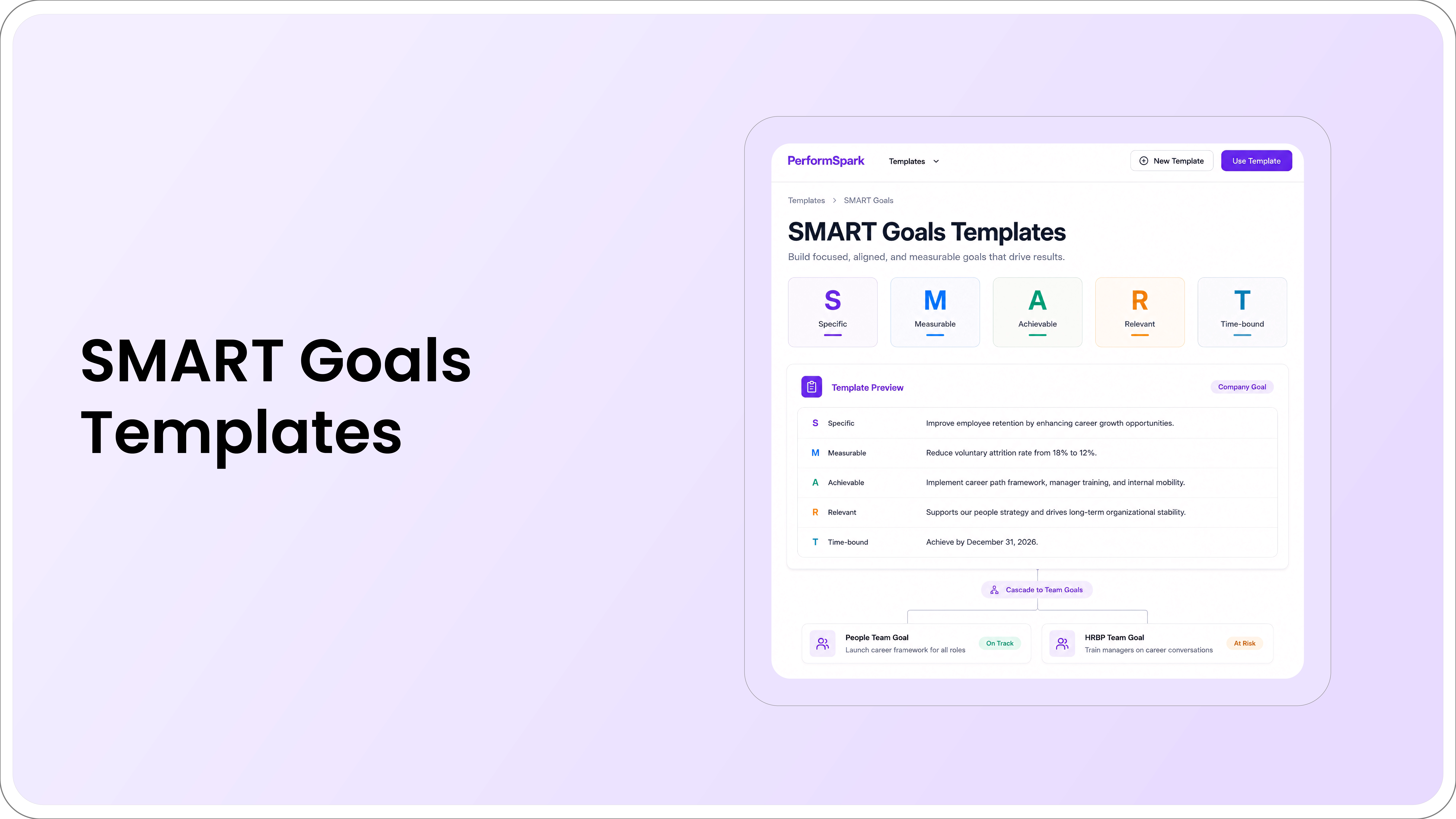
No More Stitching Tools Together

OKRs, Performance Reviews & 1:1s β€” Connected in One System

PerformSpark connects cascading OKRs to performance reviews, one-on-ones, and recognition, so HR runs company-wide goals and its own departmental objectives without stitching together separate tools.

Book a Demo β†’

Table of Contents

Search "best OKR software" and the first five results compare eight, ten, even thirteen tools across dozens of features, AI capabilities, customization depth, strategy maps, and scoring rubrics. By the third comparison table, most HR teams are no closer to a decision than when they started. The irony is that OKR software exists to simplify goal tracking, and the buying process for it has become exactly the kind of complicated, sprawling exercise the framework was built to avoid.

HR teams have a narrower, more specific need than the generic "any team, any department" framing most buying guides assume. HR is usually the function rolling out OKR software company-wide, which means evaluating it for every other department’s use case. HR is also, separately, a department with its own goals: reducing time-to-hire, improving retention, and lifting engagement scores. Most OKR content treats these as the same problem. They are not, and conflating them is part of why the decision feels harder than it needs to be.

This guide cuts the evaluation down to the features that actually predict adoption, walks through a three-step framework for choosing without the 10-factor sprawl, and covers how HR teams specifically use OKRs, both for the organization and for their own department.

What Is OKR Software for HR Teams?

OKR software for HR teams is goal-management software built around the Objectives and Key Results framework, where a qualitative objective pairs with measurable key results that prove progress toward it. For HR specifically, the software typically does two jobs at once: it is the platform HR administers for every department’s goals, and it is the tool HR uses to set and track its own objectives, things like reducing time-to-fill for open roles, improving 90-day retention, or hitting an internal mobility target.

This dual purpose is what most generic goal-setting guides miss. A sales team evaluating OKR software only needs the first use case. HR needs both, and the features that matter for administering goals company-wide are not always the same features that matter for HR’s own goal tracking.

Practitioner Insight: HR teams that roll out OKR software company-wide often forget to set OKRs for HR itself until months into the rollout, treating the function as the administrator rather than a participant. The teams that get the most value flip this: HR sets its own OKRs in the first cycle, using the same tool, which surfaces friction in the actual user experience before asking every other department to adopt it.

Why HR Teams Overcomplicate Goal Tracking

The overcomplication usually starts before the software is even selected. Four patterns show up repeatedly.

  • Feature-shopping instead of needs-mapping. Evaluating every available feature, AI drafting, strategy maps, KPI linking, scoring rubrics, before defining what HR is actually trying to fix, produces a comparison table with no clear winner, because every tool looks strong on some dimension.
  • Buying for the org chart, not the goal-setting maturity. A 50-person company evaluating enterprise-grade cascading hierarchies built for 5,000-person organizations is solving a problem it does not have yet, and the complexity slows adoption rather than supporting it.
  • Running multiple frameworks at once before the first one sticks. OKRs, SMART goals, and KPIs are not competing systems, but trying to support all three from day one multiplies the configuration decisions HR has to make before anyone sets a single goal.
  • Treating HRIS and compliance as an afterthought. Integration and data privacy questions often surface during procurement, after a tool has already been selected on feature fit, which forces a second evaluation cycle that could have happened the first time.

Start With The Process, Not The Features

Before comparing tools, map what HR actually needs to track. A short goal management software checklist beats a feature-by-feature spreadsheet every time.

Book a Demo

The Only Features That Actually Matter for HR Teams

Strip away the feature lists that pad most buying guides, and five things consistently separate OKR software HR teams actually adopt from software that gets abandoned after one quarter.

  • Cascading goals and a real hierarchy. Cascading goals connect individual key results up through team objectives to company priorities, so contributors can see how their work ladders up without HR manually mapping the relationships in a spreadsheet.
  • Real-time progress tracking, not manual percentage updates. If updating a goal requires logging into a separate tool and typing in a number, updates lapse within a few weeks. Real-time progress tracking pulled from connected systems keeps the data current without relying on memory.
  • Integration with performance reviews and one-on-ones. Goal progress that automatically surfaces inside one-on-ones and performance reviews turns goal tracking from a separate administrative task into part of the conversations managers already have.
  • Integrations with the tools teams already use. Slack, Jira, and Salesforce integrations matter more than any AI feature, since they remove the single biggest adoption barrier: asking employees to update goals in a tool they otherwise never open.
  • HRIS connectivity and HR-grade data privacy. Because OKR software touching HR data inherits HR’s compliance obligations, confirm HRIS sync and data privacy standards before evaluating anything else, not after a tool has already been shortlisted.

How OKR Software Differs from General Goal-Setting Software

OKR software is a specific type of goal-setting software, not a synonym for it. Goal-setting software is the broader category, and it may support OKRs, SMART goals, KPIs, or a custom framework. OKR software is purpose-built around the Objectives and Key Results structure, specifically: a qualitative objective, paired with two to five measurable key results, typically run on quarterly cycles. SMART goals operate differently. They are individual, outcome-focused targets (specific, measurable, achievable, relevant, time-bound) that work well for personal development goals but were not designed for the company-to-individual cascading that OKRs handle. Many organizations use both: OKRs for strategic, cross-functional priorities, and SMART goals for individual development goals inside an employee’s growth plan.

A Simple Framework for Choosing, in Three Steps

This replaces the 10-factor evaluation table most buying guides default to. Three steps, in order, are enough for most HR teams.

  • Step 1: Separate the two use cases. Decide whether you are evaluating software to administer company-wide goals, to run HR’s own OKRs, or both. The answer changes, which features matter actually, and prevents the comparison from sprawling across every possible HR workflow.
  • Step 2: Score against the five-feature checklist, nothing else. Run every shortlisted tool against cascading goals, real-time tracking, review, and one-on-one integration, workflow integrations, and HRIS or compliance fit. Anything beyond these five is a tiebreaker, not a deciding factor.
  • Step 3: Pilot with one team before a company-wide rollout. A four to six-week pilot with a single department surfaces adoption friction, missing integrations, and confusing workflows while the stakes are low, well before the cost of a full rollout makes those same problems expensive to fix.

Common Mistakes HR Teams Make When Choosing OKR Software

  • Evaluating AI features before evaluating adoption. AI-drafted goals are a convenience layer. A tool with weak adoption and strong AI still ends up as an unused tool with strong AI.
  • Skipping automated reminders as a "nice to have." Manual check-in reminders are the first thing to slip once a quarter gets busy. Automated reminders that nudge employees and managers before a goal goes stale are what keep an OKR program alive past the first cycle.
  • Letting the vendor demo define the evaluation criteria. Sales demos showcase the features the vendor wants to highlight, not necessarily the five that matter most for your rollout. Score against your own checklist first, then watch the demo.
  • Treating goal-setting software and performance management software as interchangeable. Goal-setting software creates, tracks, and aligns objectives. Performance management software uses that goal data alongside reviews and feedback to assess and develop employees. Many platforms do both, but confirm which one you are actually buying.

Keep Goals, Reviews, And 1:1s In One Place

See how PerformSpark keeps OKRs, performance reviews, and one-on-ones in a single system instead of three separate tools HR has to reconcile manually.

Book a Demo

How HR Teams Can Use OKRs to Improve Employee Engagement

OKRs improve engagement indirectly by making the connection between individual work and company priorities visible, not by being a survey or sentiment tool themselves. When employees can see how their key results ladder up into team and company objectives, the ambiguity that drives disengagement- not knowing whether the work matters- goes away. Pairing goal visibility with recognition reinforces the effect: when progress on a key result is acknowledged in the moment rather than only at quarter-end, employees experience goal-setting as a feedback loop rather than a top-down mandate.

Tying goal achievement to employee recognition inside the same system, both data points live in, keeps the connection between effort and acknowledgment close together in time, which is what makes recognition reinforcing rather than incidental.

Measuring HR Team Success With OKR Software

HR’s own OKRs deserve the same rigor HR asks of every other department. Examples of HR-specific objectives and key results worth tracking inside the same system used for company-wide goals:

  • Objective: Reduce time-to-fill across open roles. Key results: cut average time-to-fill from 45 to 30 days; reduce offer-decline rate from 18 percent to 10 percent.
  • Objective: Improve early-tenure retention. Key results: raise 90-day retention from 85 percent to 93 percent; reduce regrettable attrition in the first year by 20 percent.
  • Objective: Strengthen internal mobility. Key results: fill 25 percent of open roles internally, up from 12 percent; increase participation in internal development goal conversations by 30 percent.
  • Objective: Raise engagement and manager effectiveness. Key results: lift eNPS by 10 points; raise the percentage of employees with a completed one-on-one in the last two weeks from 60 percent to 90 percent.

Tracking these inside the same OKR software used for company-wide goals, rather than in a separate HR-only spreadsheet, means HR’s own progress is visible with the same real-time accuracy expected from every other department.

Implementing OKR Software in an HR Department: Step by Step

  • Set HR’s own OKRs first. Before rolling the tool out company-wide, use it to run HR’s own first cycle. This surfaces usability friction while the stakes are contained to one team.
  • Pilot with one additional department. Choose a team with a manager who is bought in, run a full four to six-week cycle, and gather specific feedback on what slowed adoption.
  • Fix the integration gaps before scaling. If goal updates require manual entry instead of flowing from connected tools, fix that before the second department onboards, since the friction compounds at scale.
  • Train managers before training individual contributors. Managers run the check-in conversations that keep OKRs alive between cycles. Investing training time in managers first produces better adoption than a single company-wide announcement.
  • Roll out company-wide in waves, not all at once. Staggering the rollout by department lets HR apply lessons from the pilot before the highest-stakes teams, usually the largest or most senior, go live.

The buying guides that dominate search results for OKR software solve the wrong problem. They add more tools to compare and more features to weigh, when what HR teams actually need is a shorter list: five features that predict adoption, a three-step framework instead of a ten-factor table, and clarity on whether the tool needs to handle company-wide goals, HR’s own OKRs, or both.

Why PerformSpark Is the Right Choice for HR Teams

Measured against the five-feature checklist this guide opened with, PerformSpark covers every one of them inside a single system. Goal management software handles cascading goals and hierarchy out of the box, so individual key results connect to team and company objectives without HR maintaining the mapping manually. Reporting and analytics deliver real-time progress tracking pulled from connected data rather than manual percentage updates. Performance reviews, check-ins, and 1:1s run in the same platform as goals, so progress surfaces automatically inside the conversations managers are already having instead of living in a separate, disconnected tool. TrAI brings AI-assisted goal drafting and insight to the goal-setting process itself, and smart notifications keep check-ins and updates from going quiet between cycles. For HR leaders deciding between a sprawling enterprise suite and a tool nobody adopts, PerformSpark is built around the same principle this guide argues for: the fewer systems HR has to reconcile, the more likely the OKR program survives past its first quarter.

That combination- goals, reviews, one-on-ones, recognition, and reporting in one place- is what makes PerformSpark the strongest fit specifically for HR leaders who need to administer OKRs company-wide while also running HR's own departmental objectives in the same system, not a second spreadsheet.

No More Stitching Tools Together

OKRs, Performance Reviews & 1:1s β€” Connected in One System

PerformSpark connects cascading OKRs to performance reviews, one-on-ones, and recognition, so HR runs company-wide goals and its own departmental objectives without stitching together separate tools.

Book a Demo β†’

Key Takeaways

  • Most OKR buying guides overcomplicate the decision by comparing ten or more tools across dozens of features. HR teams need a shorter list of must-haves tied to their actual goal-tracking problem.
  • OKR software for HR teams serves two distinct purposes: tracking company-wide employee goals and managing HR’s own departmental OKRs, such as retention and time-to-hire.
  • Cascading goals and integration with performance reviews and one-on-ones matter more for adoption than AI features or deep customization.
  • The most common reason OKR programs fail is not a framework problem; it is a systems problem: goals get written once and then go stale because the tool sits outside daily work.
  • HRIS integration and data privacy compliance are non-negotiable for HR teams specifically, since OKR software touching HR data carries different compliance requirements than a goals tool used by engineering or sales.

Search "best OKR software" and the first five results compare eight, ten, even thirteen tools across dozens of features, AI capabilities, customization depth, strategy maps, and scoring rubrics. By the third comparison table, most HR teams are no closer to a decision than when they started. The irony is that OKR software exists to simplify goal tracking, and the buying process for it has become exactly the kind of complicated, sprawling exercise the framework was built to avoid.

HR teams have a narrower, more specific need than the generic "any team, any department" framing most buying guides assume. HR is usually the function rolling out OKR software company-wide, which means evaluating it for every other department’s use case. HR is also, separately, a department with its own goals: reducing time-to-hire, improving retention, and lifting engagement scores. Most OKR content treats these as the same problem. They are not, and conflating them is part of why the decision feels harder than it needs to be.

This guide cuts the evaluation down to the features that actually predict adoption, walks through a three-step framework for choosing without the 10-factor sprawl, and covers how HR teams specifically use OKRs, both for the organization and for their own department.

What Is OKR Software for HR Teams?

OKR software for HR teams is goal-management software built around the Objectives and Key Results framework, where a qualitative objective pairs with measurable key results that prove progress toward it. For HR specifically, the software typically does two jobs at once: it is the platform HR administers for every department’s goals, and it is the tool HR uses to set and track its own objectives, things like reducing time-to-fill for open roles, improving 90-day retention, or hitting an internal mobility target.

This dual purpose is what most generic goal-setting guides miss. A sales team evaluating OKR software only needs the first use case. HR needs both, and the features that matter for administering goals company-wide are not always the same features that matter for HR’s own goal tracking.

Practitioner Insight: HR teams that roll out OKR software company-wide often forget to set OKRs for HR itself until months into the rollout, treating the function as the administrator rather than a participant. The teams that get the most value flip this: HR sets its own OKRs in the first cycle, using the same tool, which surfaces friction in the actual user experience before asking every other department to adopt it.

Why HR Teams Overcomplicate Goal Tracking

The overcomplication usually starts before the software is even selected. Four patterns show up repeatedly.

  • Feature-shopping instead of needs-mapping. Evaluating every available feature, AI drafting, strategy maps, KPI linking, scoring rubrics, before defining what HR is actually trying to fix, produces a comparison table with no clear winner, because every tool looks strong on some dimension.
  • Buying for the org chart, not the goal-setting maturity. A 50-person company evaluating enterprise-grade cascading hierarchies built for 5,000-person organizations is solving a problem it does not have yet, and the complexity slows adoption rather than supporting it.
  • Running multiple frameworks at once before the first one sticks. OKRs, SMART goals, and KPIs are not competing systems, but trying to support all three from day one multiplies the configuration decisions HR has to make before anyone sets a single goal.
  • Treating HRIS and compliance as an afterthought. Integration and data privacy questions often surface during procurement, after a tool has already been selected on feature fit, which forces a second evaluation cycle that could have happened the first time.

Start With The Process, Not The Features

Before comparing tools, map what HR actually needs to track. A short goal management software checklist beats a feature-by-feature spreadsheet every time.

Book a Demo

The Only Features That Actually Matter for HR Teams

Strip away the feature lists that pad most buying guides, and five things consistently separate OKR software HR teams actually adopt from software that gets abandoned after one quarter.

  • Cascading goals and a real hierarchy. Cascading goals connect individual key results up through team objectives to company priorities, so contributors can see how their work ladders up without HR manually mapping the relationships in a spreadsheet.
  • Real-time progress tracking, not manual percentage updates. If updating a goal requires logging into a separate tool and typing in a number, updates lapse within a few weeks. Real-time progress tracking pulled from connected systems keeps the data current without relying on memory.
  • Integration with performance reviews and one-on-ones. Goal progress that automatically surfaces inside one-on-ones and performance reviews turns goal tracking from a separate administrative task into part of the conversations managers already have.
  • Integrations with the tools teams already use. Slack, Jira, and Salesforce integrations matter more than any AI feature, since they remove the single biggest adoption barrier: asking employees to update goals in a tool they otherwise never open.
  • HRIS connectivity and HR-grade data privacy. Because OKR software touching HR data inherits HR’s compliance obligations, confirm HRIS sync and data privacy standards before evaluating anything else, not after a tool has already been shortlisted.

How OKR Software Differs from General Goal-Setting Software

OKR software is a specific type of goal-setting software, not a synonym for it. Goal-setting software is the broader category, and it may support OKRs, SMART goals, KPIs, or a custom framework. OKR software is purpose-built around the Objectives and Key Results structure, specifically: a qualitative objective, paired with two to five measurable key results, typically run on quarterly cycles. SMART goals operate differently. They are individual, outcome-focused targets (specific, measurable, achievable, relevant, time-bound) that work well for personal development goals but were not designed for the company-to-individual cascading that OKRs handle. Many organizations use both: OKRs for strategic, cross-functional priorities, and SMART goals for individual development goals inside an employee’s growth plan.

A Simple Framework for Choosing, in Three Steps

This replaces the 10-factor evaluation table most buying guides default to. Three steps, in order, are enough for most HR teams.

  • Step 1: Separate the two use cases. Decide whether you are evaluating software to administer company-wide goals, to run HR’s own OKRs, or both. The answer changes, which features matter actually, and prevents the comparison from sprawling across every possible HR workflow.
  • Step 2: Score against the five-feature checklist, nothing else. Run every shortlisted tool against cascading goals, real-time tracking, review, and one-on-one integration, workflow integrations, and HRIS or compliance fit. Anything beyond these five is a tiebreaker, not a deciding factor.
  • Step 3: Pilot with one team before a company-wide rollout. A four to six-week pilot with a single department surfaces adoption friction, missing integrations, and confusing workflows while the stakes are low, well before the cost of a full rollout makes those same problems expensive to fix.

Common Mistakes HR Teams Make When Choosing OKR Software

  • Evaluating AI features before evaluating adoption. AI-drafted goals are a convenience layer. A tool with weak adoption and strong AI still ends up as an unused tool with strong AI.
  • Skipping automated reminders as a "nice to have." Manual check-in reminders are the first thing to slip once a quarter gets busy. Automated reminders that nudge employees and managers before a goal goes stale are what keep an OKR program alive past the first cycle.
  • Letting the vendor demo define the evaluation criteria. Sales demos showcase the features the vendor wants to highlight, not necessarily the five that matter most for your rollout. Score against your own checklist first, then watch the demo.
  • Treating goal-setting software and performance management software as interchangeable. Goal-setting software creates, tracks, and aligns objectives. Performance management software uses that goal data alongside reviews and feedback to assess and develop employees. Many platforms do both, but confirm which one you are actually buying.

Keep Goals, Reviews, And 1:1s In One Place

See how PerformSpark keeps OKRs, performance reviews, and one-on-ones in a single system instead of three separate tools HR has to reconcile manually.

Book a Demo

How HR Teams Can Use OKRs to Improve Employee Engagement

OKRs improve engagement indirectly by making the connection between individual work and company priorities visible, not by being a survey or sentiment tool themselves. When employees can see how their key results ladder up into team and company objectives, the ambiguity that drives disengagement- not knowing whether the work matters- goes away. Pairing goal visibility with recognition reinforces the effect: when progress on a key result is acknowledged in the moment rather than only at quarter-end, employees experience goal-setting as a feedback loop rather than a top-down mandate.

Tying goal achievement to employee recognition inside the same system, both data points live in, keeps the connection between effort and acknowledgment close together in time, which is what makes recognition reinforcing rather than incidental.

Measuring HR Team Success With OKR Software

HR’s own OKRs deserve the same rigor HR asks of every other department. Examples of HR-specific objectives and key results worth tracking inside the same system used for company-wide goals:

  • Objective: Reduce time-to-fill across open roles. Key results: cut average time-to-fill from 45 to 30 days; reduce offer-decline rate from 18 percent to 10 percent.
  • Objective: Improve early-tenure retention. Key results: raise 90-day retention from 85 percent to 93 percent; reduce regrettable attrition in the first year by 20 percent.
  • Objective: Strengthen internal mobility. Key results: fill 25 percent of open roles internally, up from 12 percent; increase participation in internal development goal conversations by 30 percent.
  • Objective: Raise engagement and manager effectiveness. Key results: lift eNPS by 10 points; raise the percentage of employees with a completed one-on-one in the last two weeks from 60 percent to 90 percent.

Tracking these inside the same OKR software used for company-wide goals, rather than in a separate HR-only spreadsheet, means HR’s own progress is visible with the same real-time accuracy expected from every other department.

Implementing OKR Software in an HR Department: Step by Step

  • Set HR’s own OKRs first. Before rolling the tool out company-wide, use it to run HR’s own first cycle. This surfaces usability friction while the stakes are contained to one team.
  • Pilot with one additional department. Choose a team with a manager who is bought in, run a full four to six-week cycle, and gather specific feedback on what slowed adoption.
  • Fix the integration gaps before scaling. If goal updates require manual entry instead of flowing from connected tools, fix that before the second department onboards, since the friction compounds at scale.
  • Train managers before training individual contributors. Managers run the check-in conversations that keep OKRs alive between cycles. Investing training time in managers first produces better adoption than a single company-wide announcement.
  • Roll out company-wide in waves, not all at once. Staggering the rollout by department lets HR apply lessons from the pilot before the highest-stakes teams, usually the largest or most senior, go live.

The buying guides that dominate search results for OKR software solve the wrong problem. They add more tools to compare and more features to weigh, when what HR teams actually need is a shorter list: five features that predict adoption, a three-step framework instead of a ten-factor table, and clarity on whether the tool needs to handle company-wide goals, HR’s own OKRs, or both.

Why PerformSpark Is the Right Choice for HR Teams

Measured against the five-feature checklist this guide opened with, PerformSpark covers every one of them inside a single system. Goal management software handles cascading goals and hierarchy out of the box, so individual key results connect to team and company objectives without HR maintaining the mapping manually. Reporting and analytics deliver real-time progress tracking pulled from connected data rather than manual percentage updates. Performance reviews, check-ins, and 1:1s run in the same platform as goals, so progress surfaces automatically inside the conversations managers are already having instead of living in a separate, disconnected tool. TrAI brings AI-assisted goal drafting and insight to the goal-setting process itself, and smart notifications keep check-ins and updates from going quiet between cycles. For HR leaders deciding between a sprawling enterprise suite and a tool nobody adopts, PerformSpark is built around the same principle this guide argues for: the fewer systems HR has to reconcile, the more likely the OKR program survives past its first quarter.

That combination- goals, reviews, one-on-ones, recognition, and reporting in one place- is what makes PerformSpark the strongest fit specifically for HR leaders who need to administer OKRs company-wide while also running HR's own departmental objectives in the same system, not a second spreadsheet.

No More Stitching Tools Together

OKRs, Performance Reviews & 1:1s β€” Connected in One System

PerformSpark connects cascading OKRs to performance reviews, one-on-ones, and recognition, so HR runs company-wide goals and its own departmental objectives without stitching together separate tools.

Book a Demo β†’

Frequently Asked Questions

How does OKR software integrate with existing HRIS systems?

What features should I look for in an HR OKR management system?

Are there free trial options for OKR software for HR teams?

How can HR teams use OKRs to improve employee engagement?

How do I measure HR team success using OKR software?

Are there secure OKR software options compliant with HR data privacy standards?

What is the best practice for implementing OKR software in an HR department?

Make performance reviews your growth lever

No credit card required β€’ Free setup & training included β€’ Cancel anytime

CTA ShapeCTA Shape